
See this article to understand the need for Outcomes and Intentions and where they fit in the Metolius survey Framework.
Adding an Outcome
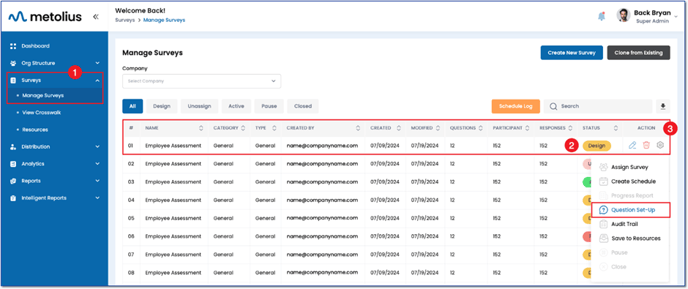
- Expand the Survey menu on the main navigation panel and click on Manage Surveys.
- Locate the survey you wish to edit on the Manage Surveys page. Ensure the survey is in the Design Status.
- In the Action column, click the gear icon corresponding to the survey you want to edit. Select Question Set-Up.
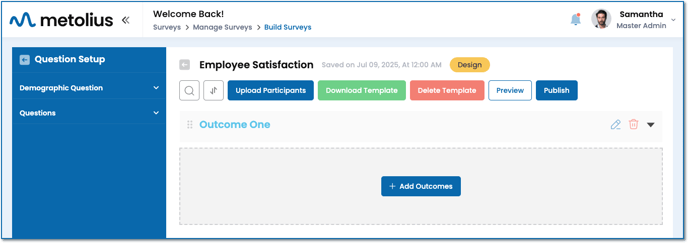
- On the Build Surveys page, click on + Add Outcome.
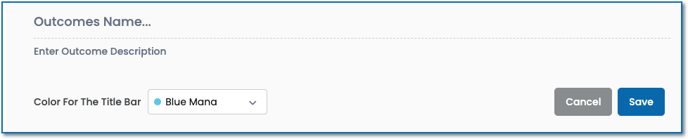
- Enter a name for your Outcome in the designated field.
- Choose to enter a short description for the outcome to help participants understand the purpose of that section.
- You may also choose a color for the outcome title bar that will also present to the participants.
- Click Save. Repeat this step for each additional Outcome needed.
Adding Questions and Intentions
Once an Outcome has been created, you can add questions to it. Once a question is created, you can add the intention it should be categorized by.
- Click on the Question Set-Up navigation bar and select Questions to view the available question types.
- Click on the links below for instructions on adding each question type:
- Single Select Rating
- Nested Rating
- OEQ (Open-Ended Question)
- Multi-Response
- Gate Qualifier